Posts Tagged ‘Shimelle’

Make A Wish – Journaling Prompt

Thursday, July 1st, 2010

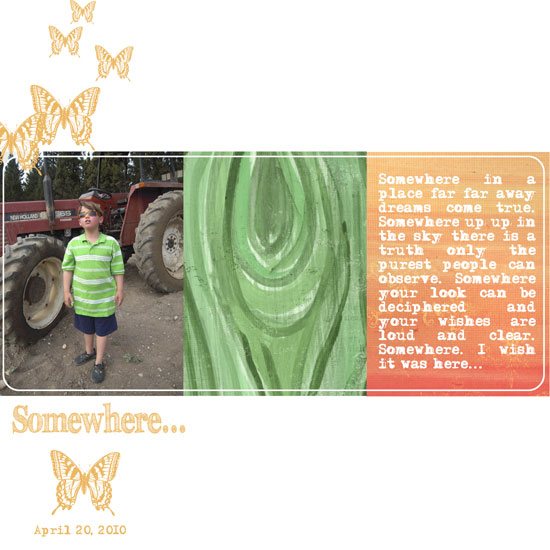
Somewhere

[Fonts: Adler & FFF Tusj; Digital Kits:Bazinga by Shimelle Laine for Two Peas In A Bucket.]

Who said you can only journal about the past or only tell stories that actually happen…?

Try a different approach.

Make a layout which is all about what you WISH would have happened or will happen.

Make it as probable or as far fetched as you wish – as long as you are setting your wish-bone free…

My journaling reads:

Somewhere in a place far far away dreams come true. Somewhere up up in the sky there is a truth only the purest people can observe. Somewhere your look can be deciphered and your wishes are loud and clear. Somewhere. I wish it was here…

Share

To jump start your wishing process, share one wish with me?
What is the first wish that comes to your mind right now? Leave a comment and wish along with me.

Make Your Own Planner Workshop
Check out Creativity Prompt’s self paced workshop: “Capture Your Dream”. In this workshop you will capture, follow and make your dream come true as well as document your journey in a fabulous mixed media mini album.


Hybrid Card – Using Digital Alpha Sets

Wednesday, June 2nd, 2010

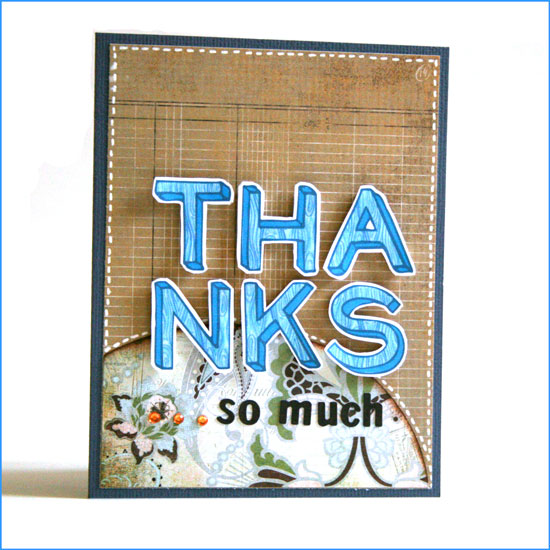
Hybrid Thanks Card

[Supply: You Are Amazing (woodgrain alpha) by Shimelle Laine for Two Peas In A Bucket, Basics + Cappella (patterned paper + small alpha stickers) by Basic Grey, Rhinestones by Kaiser Scrapbooks, Earthtones cardstock by American Crafts, White gel pen by Uniball, Foam dimensionals.]

Step By Step Instructions

Using Digital Alphas

  1. Open a new document in Photoshop Elements: Width: 8.5″ Height: 11″ DPI: 300.
  2. Use the rectangle shape tool and add a rectangle, sized 4.25″ by 5.5″. By doing that you make sure the size of your alphas will be perfect.
  3. Open up all the different letters you need for your greeting from the kit. Use the move tool to drag and drop them on your new document.
  4. Before positioning the letters you need to resize them. To do that, line them all up in one straight line – regardless of the way you want to put them on your card.
  5. Pick all the layers with the letters (Just click on the layer with your CTR/CMD button pressed down) – make sure they are all highlighted.
  6. Pick the move tool ,then press align and opt for the center alignment.
  7. While your layers are still all highlighted – click on one of the edges of the word and drag the cursor towards the center. This way you are resizing the letters proportionally.
  8. After you get to a size you are please with, position the letters the way you want them on the card. The rectangle shape you drew earlier will help you keep the proportions and size right.
  9. Conceal the layer with the rectangle shape by clicking on the eye icon and print your page on a white, smooth cardstock.
  10. The alphas on Shimelle’s new kit have a faint outline that you can use as cutting guidelines.

Assembling The Card

  1. Cut the patterned background paper to 5.25″ by 4″, adhere to your cardstock base.
  2. Cut the accent piece of patterned paper in a curve (using an ellipse cutter – I used Coluzzle) – make sure the base is 4″ wide.
  3. Ink up the top edge of your curved paper and adhere it to the bottom of the patterned paper you adhered before.
  4. Adhere the individual letters with foam dimensional stickers. Cut the foam adhesive down to size if needed.
  5. Add the letter stickers and the rhinestones.
  6. Give the card to a friend to show that you care and to say thank you…

Share

Who would you like to say thanks to? Have you made a hybrid card before? Share by leaving a comment here :)


New Release – You Are Amazing by Shimelle Laine

Tuesday, June 1st, 2010

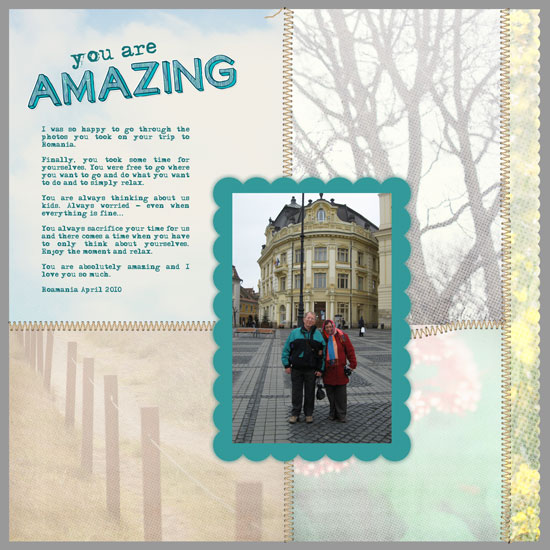
You are amazing

[Font: Adler; Digital Kits: You Are Amazing & Trip To Nature Papers - both by Shimelle Laine for Two Peas In A Bucket.]

Shimelle has released another fabulous page template with a matching woodgrain alpha set. I love this new kit, it’s funky, but still very linear and clean.

I made this page for my parents who keep living their lives for us and almost never taking time for themselves.
This photo was taken in one of the rare occasions they actually took the time…

I love them so much :)


Make Your Own Planner Workshop
Check out Creativity Prompt’s self paced workshop: “Capture Your Dream”. In this workshop you will capture, follow and make your dream come true as well as document your journey in a fabulous mixed media mini album.


Creativity Prompt – Flip Your Template

Thursday, May 27th, 2010

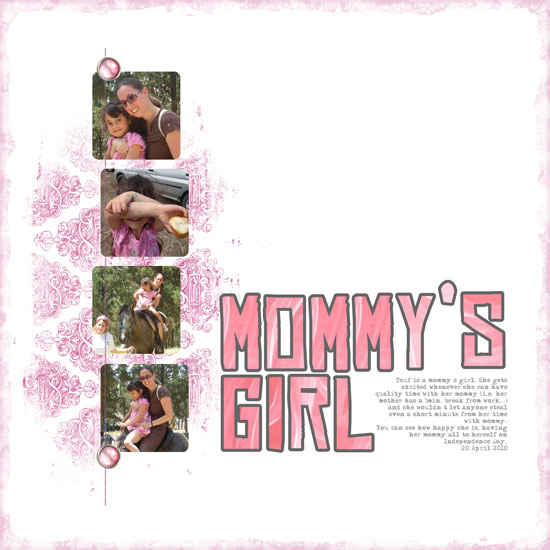
Mommy's Girl

[Font: Adler; Digital Kit: Count To Four by Shimelle Laine for Two Peas In A Bucket.]

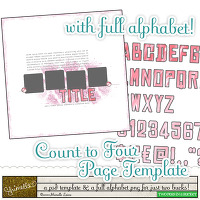
Count To Four Kit Last week I used the Count To Four template and alpha kit as is, just tweaking the colors, adding a background paper and some accent flourishes.

This week I wanted to use the exact same template, which I really like, but to make it look completely different. I also had no more than a few minutes available to make it happen… Busy times.

Well, easy.

All I had to do was to flip the template ["image" => "rotate" => "90 degrees to the right"]. I also moved the text box and title around and ended up with a completely different layout with the same 2 Dollars template… Completed in about 15 minutes.

Does it get any easier than that?

It is really important to get the stories down before they are forgotten, but many times we just do not have the time to reinvent the wheel, come up with a great design and start from scratch. Using a template (or a sketch) is a great way to go about it, but there’s a limit to how many templates we can go out and buy, isn’t it?

So here’s a good way to utilize the template you already have (or the layouts you’ve already designed) – just flip them. Vertically, horizontally, sideways. Tweak them a bit here and there and get a fabulous completely new, well designed layout in a snap.

Share

Do you reuse loved layout designs? Please share your thoughts by leaving a comment.


My Little Princess Niece Is Seven

Tuesday, May 18th, 2010

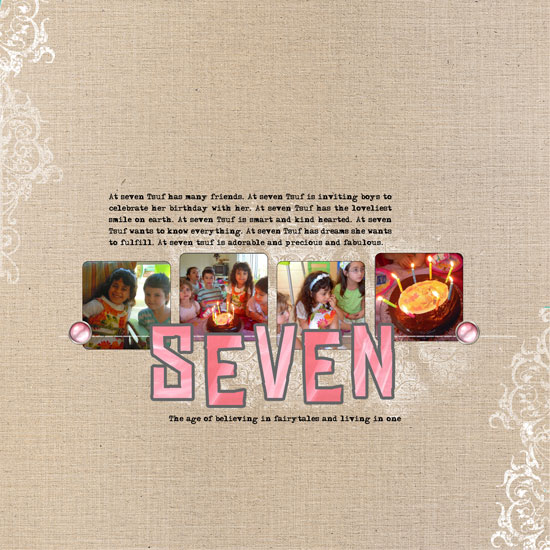
Seven

[Fonts: Adler; Digital Kits: Count To Four (alpha and template) by Shimelle Laine, Color My World by Rhonna Farrer, KD Capture and Record by Karla Dudley.]

Shimelle has released a gorgeous new digital kit which includes a template, on which the layout is based on, and a set of pink alphas. So cute.

A template is just perfect when you have absolutely no time and you want to make a winning page. Just clip your photos in place, resize, perhaps recolor. Add your journaling, title and a couple elements to add a bit of yourself and voilà.

I really love this template because it looks like a layout I would have designed myself. The rectangles, the typewriter font, the accents. I love it. (I admit, if it was my layout it would probably align in a straight line – but that’s the beauty of working with templates. I try something new and fall in love with it).

Can you believe my niece is seven already??? She’s growing fast!

Share

Have you used a template or made a layout based on a sketch before? Please share by leaving a comment.


Siblings: Compare and contrast – Journaling Prompt

Tuesday, April 20th, 2010

Siblings

[Fonts: Asha, Tidy Hand; Digital Kits: Springtime Basics, Starburst Mini, Long and Winding Road, Can't buy Me Love - All by Shimelle Laine at Two Peas In A Bucket.]

Journaling Reads

One is blond. One is brunette.
One is pale. One is tan.
One is quiet. One is verbose.
Both are fabulous.

Sometimes siblings are spitting images of each other.
Either they look alike, behave the same or think similarly – or all the above.
Sometimes the only thing siblings are sharing is their DNA.

Tsuf and Shoham, my niece and nephew are nothing alike.
[Except for both being very good kids]
They look very different and they behave really differently.

Try to make a short list and find what is similar and what is different between siblings in your family.

Share

Are you and your sibling look alike or do you look nothing like your sibling – or are you an only child?
How are your kids? Do they look and behave the same or do they have nothing in common?
Please share your comparisons. It’s fun!


Shimelle Digitals Blog Hop – New Release

Tuesday, March 23rd, 2010

I have Killed Spring

[Fonts: Bagad, Calibri; Digital Kits: Write It Down Negative Strips & Spring Time Basics by Shimelle Laine, Rhonna Botanical Swirls (brushes) by House of 3]

Write It Down :: Negative Frames Springtime Basics

In celebration of spring and the seasonable new release of Shimelle’s digital kits on Two Peas In A Bucket, the Baker’s Dozen have arranged a blog hop for you to admire the fabulous new kits and the work of the talented girls I am very happy to work with…

Spring is here, the weather is LOVELY, the flowers are in full bloom – but not at my place. I am ashamed to admit that I have killed spring at home.

How is it possible? I have no idea. But no plant had lived long enough to tell the story…

My journaling reads:

Despite my best intentions, I have killed my plants again. It started with the flowers and moved on to the unsuspecting basil. From there it went on to the lavender who suffered gravely and eventually gave up and welted. Looking at all the beautiful photos of people’s blooming gardens I am all envy. Spring has not sprung here as I have managed to kill spring. No flower or plant is blooming.

After you’ve seen spring’s antithesis in my layout, go on to Karen‘s amazing layout, where spring has definitely sprung….

In case you’ve lost your way on the layouts’ trail, here is the complete list:


Make Your Own Planner Workshop
This year you can really make your dream come true!

“Capture Your Dream” workshop is a self-paced, six weeks long workshop, that will walk you through a journey of capturing your biggest dream and making it come true.

In the process of making your dream happen – with lots of inspiration and guided self-exploration, you will also create a mixed media mini album from scratch and learn many tips and techniques – including some photography pointers that will add character to your photos and will help you take better pictures of your projects.


The workshop includes 30 printable PDF lessons with step-by-step pictures and instructions as well as several printable templates you may use in other projects too.

I am confident you will enjoy it and find it helpful so I also offer full money back guarantee while the workshop lasts.


What Makes You Smile? Journaling Prompt and a Digital Tip

Tuesday, March 9th, 2010

Nadav Makes Me Smile

[Font: Erika Ormig; Digital Kits: Write It Down Cute Circles & Autumn Apples Polka Dot Papers by Shimelle Laine, available at Two Peas in a Bucket + Blakely by Karla Dudley, available at The Digichick Shop]

Smiling is better than make up. It gives you a natural glow and a sparkle in your eyes. It deepens your dimples and covers you with irresistibleness. I am telling you – smiling is way better tan putting on make up.

You may buy make up online, at department stores, drugstores, boutique shops – but where do you get a smile?

What have you that makes you brake out with a glowing smile?
Who brightens your day in a way that curves your lips from deep inside?
What can transform a gray day into a glorious and a happy moment?
Who is able to make you forget everything but your happiness and gratefulness?

I have my Nadav, my husband.

He injects my life with humor and makes it a million times better.
He manages to make me smile and forget I have been angry for an untended chore.
He surprises me, time and again, with the creative ways he finds to make me laugh.
He brightens my day and keeps my plate of gratitude overflowing.

When asked “where did you come up with that?”, he simply answers: “my mouth” or “my hands” – depending whether his current cuteness involves a saying or a deed.

Same goes for the arbitrary day in which he brought me a plate with an “apple face” – mine is smiling and his – sour.

I was surely smiling once I got this plate, but he’s just incapable of being sour :)

I love my Nadav.

Digital Tip

Do you want your png. images or brushes in your digital kit do double duty? Then create an outlined image of them.

How To – Adobe Photoshop Elements

  1. Lay your image or brush stroke on a separate layer.
  2. Copy this layer – either right-click on the layer indicator and choose “duplicate layer” or click on the image itself, while pressing the [Alt on a PC] or [OPT on a Mac] button.
  3. Reposition the copied image with the move-tool to where you wish your outline image to be.
  4. Open a new layer above the latter.
  5. Press [CTRL on a PC] or [CMD on a MAC] and click on the image on the left side of the copy layer indicator. That step will automatically select the image’s silhouette.
  6. Make sure your new – top layer – is selected and click on: “Edit” => “Stroke” (use the eye-drop tool to choose the color from the original image) and commit.
  7. Uncheck or delete the copied layer.

Share

What makes you smile? Share by leaving a comment. I LOVE hearing from you. Each comment makes me smile, so please share!


Make Your Own Planner Workshop
Check out Creativity Prompt’s self paced workshop: “Capture Your Dream”. In this workshop you will capture, follow and make your dream come true as well as document your journey in a mixed media mini album.


Hybrid Cards – Mix Fancy With Funky

Tuesday, February 23rd, 2010

Hybrid Cards - Mix Fancy With Funky

I was looking at Shimelle’s new kit: Write It Down Ornate Frames, which “aired” today on Two Peas In A Bucket, and thought it would be just perfect for making a bunch of hybrid cards.

At first I thought to edit them on photoshop, add the greeting with one of my gazillion fonts, print out, add a ribbon, or some gems and call it a day. A great way to make a bunch of coordinating classic cards.

Then I thought, lets take it up a notch… It would be really cool to mix Shimelle’s beautiful, classical, traditional ornate frames with some funky patterned papers and a funky – non-traditional – design, and that’s exactly what I did.

I hope you like it and will give it a try. (Shimelle’s kit costs just 99 cents…)

Step by Step Instructions

Hybrid I Love You Card

  1. Use a photo editing program to lay the frame on the right side of a letter size document. Size it to measure 4″ by 5¼”. Print out the document on textured white cardstock, using the borderless settings of your printer.
  2. Cut the cardstock in half – to 5½” and fold in half at 4¼” to create a standard size card.
  3. Print out Creativity Prompt’s free classic journaling tags on plain non-textured cardstock. Cut out one of the tags and cut off about an inch from its right edge.
  4. For the letters I used plain and glittered fun foam that I cut with my Cuttlebug, using QuicKutz Moonlight dies, and adhered it with Tombow Mono Multi glue you can also use American Crafts Thickers.
  5. Adhere the journaling tag to the bottom right edge of the card using foam squares.

Hybrid Thanks Card

  1. Use a photo editing program to lay the frame on the right side of a letter size document. Size it to measure about 3½” wide (keep its proportions). Print out the document on textured white cardstock, using the borderless settings of your printer.
  2. Cut the cardstock to 5¼” by 4″.
  3. Use a craft knife to cut off the oval center of the frame.
  4. Cut a textured yellow cardstock to 8½” by 5½” and fold in half at 4¼” to make a standard size card.
  5. Cut a piece of a funky patterned paper at 3½” by 3½”.
  6. Lay the printed cardstock on the yellow card base and trace the oval window with a pencil. Adhere the patterned paper where the window will lay, over the pencil marks.
  7. For the letters I used plain and glittered fun foam that I cut with my Cuttlebug, using QuicKutz Moonlight dies, and adhered it with Tombow Mono Multi glue you can also use American Crafts Thickers.
  8. Adhere the printed cardstock with foam squares.
  9. Adhere the hearts. I Cut the heart with a Cuttlebug die from the glittered fun foam. (I used a VERY old punch for the small heart)
  10. Adhere the button (I would have used a yellow button if I had one…) with a couple mini glue dots.
  11. Adhere the line of yellow gems below the greeting.

Share

If you have any question, suggestion or remark – don’t hesitate to contact me – either leave a comment here, use the contact form or start a new thread on the Creativity Prompt Flickr Group!!!

I would also be very happy to see your own creations, so don’t be shy and share :)


Make Your Own Planner Workshop
“Capture Your Dream” workshop is relaunching as a self-paced workshop. Isn’t this the perfect time for you to capture your dream and make it happen?


Daily Reoccurrences – Journaling Prompt

Thursday, February 18th, 2010

Daily Reoccurrences

[Fonts: Rough Typewriter, Walk Around The Block; Digital Kits: Digi Essentials #2 by Karla Dudley & Write It Down Top Ten Lists + Long and Winding Road - both by Shimelle Laine.]

Journaling Prompt

One of the disadvantages of a repeated daily routine is that its details are forgotten and lost.

We are so used to repeat the same errands or be with the same people every day that we don’t always notice things about them. We don’t notice the small details of what occurs daily without fail.

In my journey to document and remember as much as I can, I try to take heed of things that I can count on – for better or for worse – to occur and reoccur every single day.

This journaling prompt is general and can refer to people who do certain things in a certain way – every day, or it can refer to errands we run daily (or several times per day, OCD?!), food we eat or beverages we drink daily, etc.

In this layout I highlighted a few of my husband’s behaviors that come up each and every day – and I love him for that… It’s the small things that count most.

Share

Leave a comment and share what things occur daily, without fail? I’d love to get a sneak peek into your dailyness (& I don’t care it isn’t a proper English word. I like it nonetheless).

Make Your Own Planner Workshop
“Capture Your Dream” workshop is relaunching as a self-paced workshop. Isn’t this the perfect time for you to capture your dream and make it happen?