/** Font types */

Posts Tagged ‘Tutorial’

Video Tutorial: How To Make A Doily Brush In Photoshop

Thursday, January 5th, 2012

Many people ask me how I make my printables.

My answer is: one layer at a time…

This is how you work with Photoshop.

You start thinking in layers.

I try to come up with shapes and styles and then, by trial and error, I create these on photoshop with the shape tools and all the masks and filters Photoshop has to offer.

Then I add other layers with lines, graph paper, patterns and brushes…

Today I wanted to share how I make one of these brushes I am talking about – a doily brush.

The same technique works with any other flat object. Lace trimmings? Why, yes!

So, without further ado:


[Go here to watch on YouTube and while there, please rate, comment and subscribe.]

I hope it was helpful and that you’ve enjoyed my tutorial.


Make Your Own Planner 2012
Check out Creativity Prompt’s unique self paced workshop: “Make Your Own Planner”. In this workshop you will make a beautiful handmade planner for 2012. Not only will you get the planner kit for instant download, but you will also get a high resolution video tutorial as well as printable instructions to guide you on each step of the way. Either treat yourself or get it to create wonderful gifts for your family and friends.
Join now – for only $12


Unleashing The Creative Child Within You
Back when we were kids creativity came naturally to us. Everything was possible and our prolific imagination was the only limit we knew.
Through the years we have grown apart from our inner creative child and along with that – have lost our pristine and utter joy of creation.

In this e-book I will pave your way back to your inner creative child, brick by brick.

“Unleashing The Creative Child Within You” will explain why you became distant from your core creativity and will reveal the secret to getting it back.

With exercises designed specifically to help you find the inner child within you, regain its confidence and unleash it – you are bound to get your mojo back faster than you think.

Get “Unleashing The Creative Child Within You” for your Kindle
for only $4.99.

You can read the Kindle book on Kindle devices, on your smart phones or on your PC or MAC.


Video Tutorial: How To Manipulate Your PDF Printables

Wednesday, January 4th, 2012

Many of you asked how to resize or recolor the printables I am sharing with you.

I have posted a written step-by-step tutorial before, but there’s nothing better than seeing what I actually do – I am a visual learner too…

So I have made a video tutorial for you guys and I hope that answers all your questions.


[Go here to watch on YouTube and while there, please rate, comment and subscribe.]


Make Your Own Planner 2012
Check out Creativity Prompt’s unique self paced workshop: “Make Your Own Planner”. In this workshop you will make a beautiful handmade planner for 2012. Not only will you get the planner kit for instant download, but you will also get a high resolution video tutorial as well as printable instructions to guide you on each step of the way. Either treat yourself or get it to create wonderful gifts for your family and friends.
Join now – for only $12


Unleashing The Creative Child Within You
Back when we were kids creativity came naturally to us. Everything was possible and our prolific imagination was the only limit we knew.
Through the years we have grown apart from our inner creative child and along with that – have lost our pristine and utter joy of creation.

In this e-book I will pave your way back to your inner creative child, brick by brick.

“Unleashing The Creative Child Within You” will explain why you became distant from your core creativity and will reveal the secret to getting it back.

With exercises designed specifically to help you find the inner child within you, regain its confidence and unleash it – you are bound to get your mojo back faster than you think.

Get “Unleashing The Creative Child Within You” for your Kindle
for only $4.99.

You can read the Kindle book on Kindle devices, on your smart phones or on your PC or MAC.

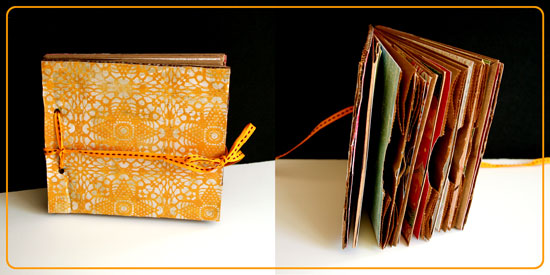
How To Make A Hardcover Mini Album With Plain Envelopes

Wednesday, May 18th, 2011

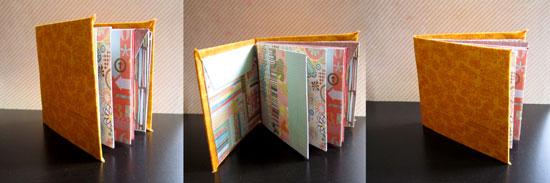
Hardcover Envelope Book

My husband thinks it’s silly but I think it’s super-duper cute, you’ll be the final judges…

Supply

Step by Step Instructions

Steps

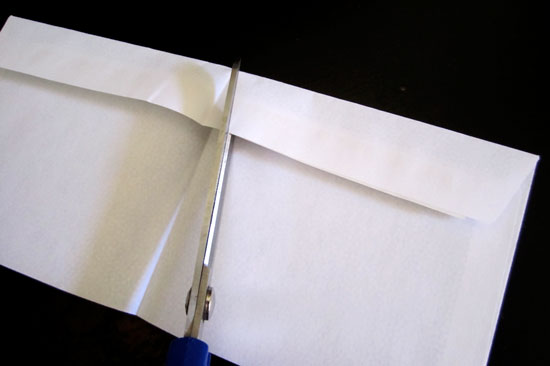
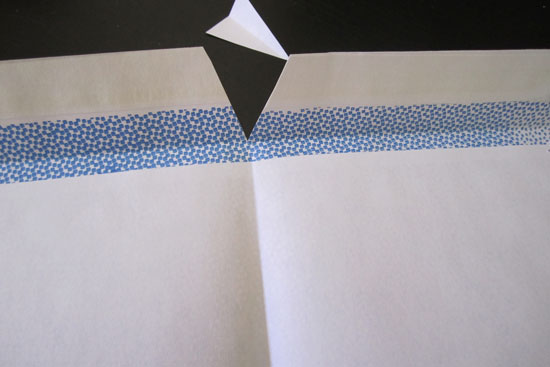
Start by folding each envelope in half and then cutting the edge of the envelope’s flap, in an angle, at the half point.
Steps

This is how your envelope will look like after its flap was cut.
Steps

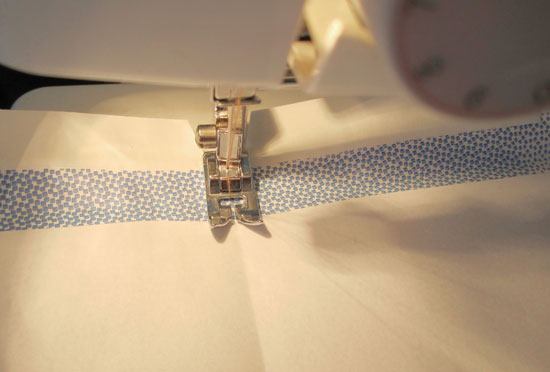
Next, channel your inner seamstress, stack all the envelopes together and sew the spine at the crease line. You can also pierce 2 holes in the spine and tie it by hand with an embroidery floss, or fasten it with a staple. Sewing is the fastest way to assemble the signature, even for me (you will understand that remark shortly).
Steps

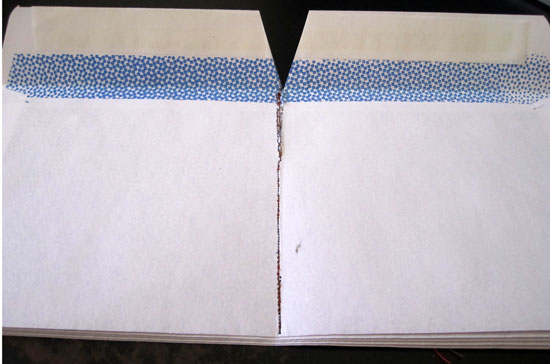
This is how your envelope stack will look like, if you are a terrible seamstress. Just like me. Who had to put it through the machine several times… I assume you may only be better than I am at that, because I am the worst, ever.
Steps

If you have sewing accidents… fix the spine with a layer of strong liquid glue.
Steps

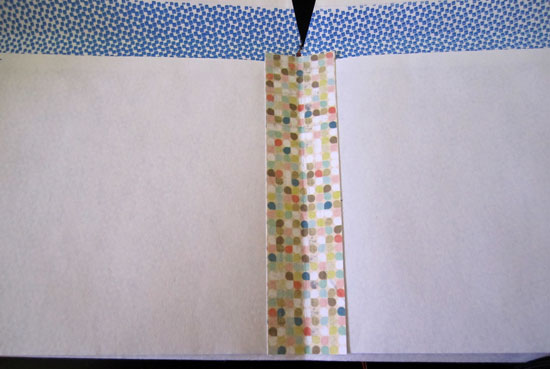
Or just secure the pages with a folded piece of patterned paper that you adhere to both pages’ edges.
Steps

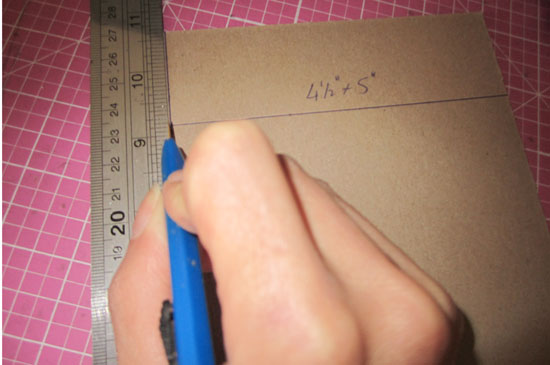
Now let’s move on to the cover, shall we? Given that you use business envelopes, cut 2 pieces of chipboard at 4½” by 5″ each. If you use any other envelope, just cut the cover a bit larger than the size of half an envelope (because they will be folded in half).
Steps

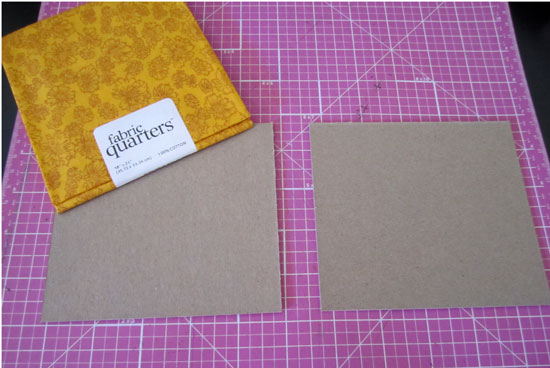
Then Choose your cover fabric. I had this fat quarter collecting dust and just waiting for this project. So I used it. Use any scrap that covers both pieces of chipboard, a spine and then some.
Steps

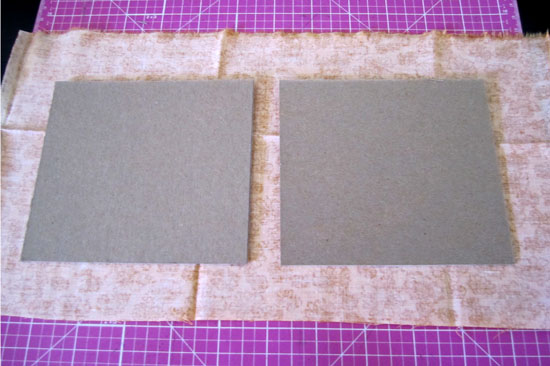
This is the ratio of fabric/ cover. Just so you will get the hang of it. Cut each edge at a triangle and adhere the flaps to the inner part of the cover with strong liquid glue. You can be messy, it will all be concealed momentarily.
Steps

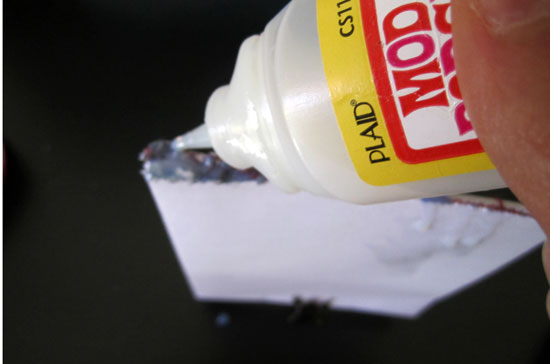
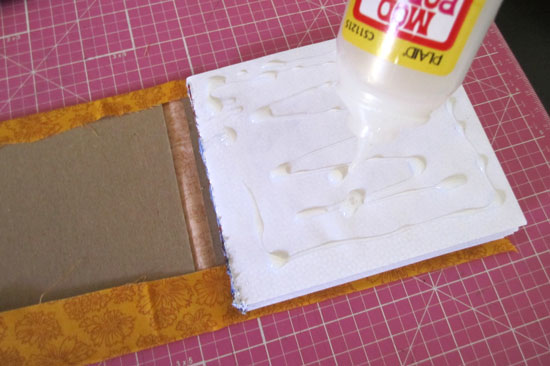
Now, attach your sewed signature by applying a generous amount of liquid glue and adhering to the inner part of the cover. Do it one side at a time and be careful of unwanted spills that may ruin your envelope pockets. Because we use envelopes to embrace and utilize their pockets, right? right.

Embellish and place top secrets and cherished memories in the pockets.

Done.

[Are you still with me or were you lost due to the length of this unearthly post? Please comment and tell.]


Make Your Own Planner Workshop
Check out Creativity Prompt’s self paced workshop: “Capture Your Dream”. In this workshop you will capture, follow and make your dream come true as well as document your journey in a fabulous mixed media mini album.


Welcome Little One Workshop
Check out Creativity Prompt’s new and unique self paced workshop: “Welcome Little One”. This workshop will provide you with everything you need, and then some, to make a fabulous handmade mini album to record the first moments of a new born baby.


If You Wish Upon A Star – Digital Video Tutorial

Thursday, October 28th, 2010

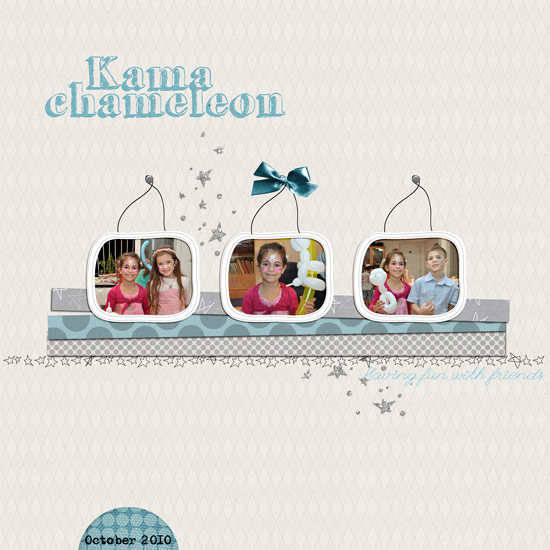
Kama Chameleon

[Fonts: Adler, Grutch Shaded and League Script; Digital Kits: Wish by Karla Dudley.]

This layout is of my 7 year-old niece and her friends playing dress up.

These pictures remind me how every time I put on a costume (Halloween, anyone…) it makes me feel like I am also getting super powers.

By dressing up as a princess I can also call upon the stars and make a wish.

Have you ever felt that way too?

Anyhow, this is why I thought these photos will be perfect to be used in conjunction with Karla Dudley’s newest kit “Wish”. [UPDATE: Karla's kit is no longer available, but she offers all the digital patterned papers from the kit as a FREE download on her blog.]

Have you made a wish lately?

If not, now is the perfect time to do so.

Just because.

I also wanted to show you how I used the transparent frames that came with the kit, and more precisely – how I fit the photos to the frames.

You can use the same technique to any transparent digital element that you want to use as an overlay.

How To


[Go here to watch on YouTube and while there, please rate, comment and subscribe.]


Make Your Own Planner 2012
Check out Creativity Prompt’s new and unique self paced workshop: “Make Your Own Planner”.
This workshop will show you how to make a beautiful handmade planner for the year 2012. Not only are you going to get the entire meticulously designed planner kit for instant download, but you will also get a high resolution video tutorial as well as step-by-step instructions to guide you on each step of the way. Either treat yourself with a fresh and creative start for the coming new year, or get it to create wonderful gifts for your family and friends.
Join now


How To Make Your Own Deco Tape

Thursday, October 21st, 2010

Deco Tape

I LOVE deco tapes.

I always last after beautifully composed photos of beautiful tape.

But I don’t have any of them beauties.

I guess their price doesn’t translate well when I think of their utility…

Then, you can imagine my utter delight when I stumbled upon this DIY Deco Tape Tutorial by my favorite diy-er, Sara.

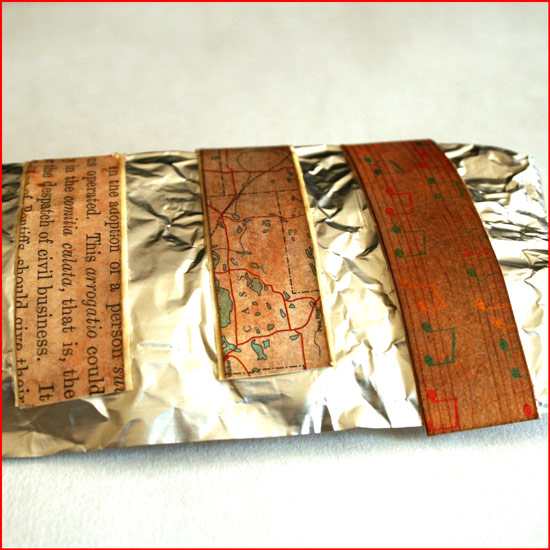
As my doodling skills are not as impressive as Sara’s, I immediately thought of using patterned paper strips with Mod Podge. It is so easy and the result is quite pleasing.

Although it doesn’t look exactly like “the real deal”, it is very close to it and much more affordable, not to mention – more flexible as for what colors/patterns you’ll be using.

Don’t stop there, you can also ink the tape, stamp on it or just leave it as is and boost its confidence with some pep talk… (Where am I going with that?)

Supply

How To


[Go here to watch on YouTube and while there, please rate, comment and subscribe.]

Step by Step Instructions

  1. Measure the width of the tape you’re using and cut paper strips, the same width as the tape.
  2. Prepare the strips by inking them with distress ink (optional) and conditioning them with water. To do that saturate the strips with a couple spritzes of water using a mister. To add some sheen I added 2 tiny scoops of golden perfect pearl medium to the tap water, but that’s optional too. Blot the excess water with paper towels.
  3. When the strips are completely dry, temporarily adhere the masking tape, in the length of your choice, to a non-stick mat.
  4. Apply a layer of Mod Podge to the tape – not too thin and not too thick – and adhere the paper strips to it. Apply more glue, if necessary. Eliminate all air bubbles by applying pressure with your finger on top of the paper strips. Use your finger, as if it was a brayer. Then let it dry – COMPLETELY.
  5. Apply a second, top layer, of Mod Podge. Apply it generously – it will be used as a sealer. Let it dry COMPLETELY.
  6. Remove the excess glue by going over it with your fingers and peel off the tape from the non stick mat. Transfer the tape to a non stick sheet you use in the kitchen. You can also roll them against a round handle (the brush’s handle is perfect for that) to make your own tape-roll.

Share

Do you work with deco tape? What do you use it for? Please share by leaving a comment.


Make Your Own Planner 2012
Check out Creativity Prompt’s new and unique self paced workshop: “Make Your Own Planner”.
This workshop will show you how to make a beautiful handmade planner for the year 2012. Not only are you going to get the entire meticulously designed planner kit for instant download, but you will also get a high resolution video tutorial as well as step-by-step instructions to guide you on each step of the way. Either treat yourself with a fresh and creative start for the coming new year, or get it to create wonderful gifts for your family and friends.
Join now


How To Make A Recycled Lunch Bags Mini Album

Thursday, September 30th, 2010

Lunch Bags Mini Album

It didn’t take me long to come up with another carfty recycling project. After all, making mini books and albums is much more fun then carrying all the empty boxes that arrive each week from Amazon to the recycling bin, isn’t it? (I refuse to admit I have an ACOD – ‘Amazon Compulsive Ordering Disorder’… Plus one of them boxes must be my husband’s me thinks.)

Anyway…

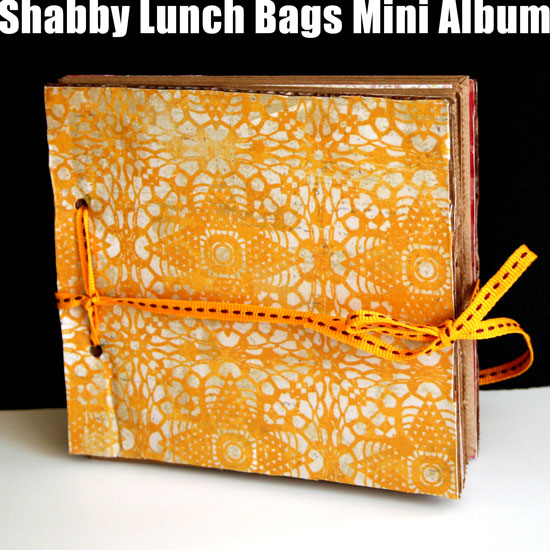
Here is another recycling project I share with you, in which I transform 5 small lunch bags and a small box into a super cute shabby mini album with room for memorabilia, ephemera, photos, hidden journaling and what not.

Supply

How-To


[Go here to watch on YouTube and while there, please rate, comment and subscribe.]

Step-By-Step Instructions

  1. Adhere the flap of the lunch bag, inwards, by applying adhesive just to the edges of the flap, so you create a small pocket. Fold in half and repeat with all the bags.
  2. Measure the height and width of the folded bag and cut the cover pieces to the same size out of the box, using a sharp craft knife. Don’t apply pressure on the knife, just use shallow back and forth movements with the knife until the cardboard is separated.
  3. Cover the cover pieces with patterned paper – start by applying a thin but thorough layer of Mod Podge with a foam brush. Adhere the paper onto the cardboard. Flip the piece and cut off the excess paper by using the edges of the cardboard as a straight edge for your craft knife. Lastly, apply a thick layer of Mod Podge to seal it off. Repeat on both sides of both cover pieces.
  4. Cover the inside pages of the lunch bag signatures with patterned paper, make sure you keep the flap pockets opened.
  5. Measure 1 inch above and below the center point of the edge of the cover and mark it. Punch holes through these tick marks and repeat on all pages and the back cover.

Lunch bags mini album preview

Share

If you have any question, suggestion or remark – don’t hesitate to contact me – either leave a comment here, use the contact form or start a new thread on the Creativity Prompt Flickr Group!!!

I would also be very happy to see your own creations, so don’t be shy and share :)


Make Your Own Planner 2012
Check out Creativity Prompt’s new and unique self paced workshop: “Make Your Own Planner”.
This workshop will show you how to make a beautiful handmade planner for the year 2012. Not only are you going to get the entire meticulously designed planner kit for instant download, but you will also get a high resolution video tutorial as well as step-by-step instructions to guide you on each step of the way. Either treat yourself with a fresh and creative start for the coming new year, or get it to create wonderful gifts for your family and friends.
Join now


Video Tutorial – How To Make A Mini Book Out Of Soap Wrap

Monday, September 13th, 2010

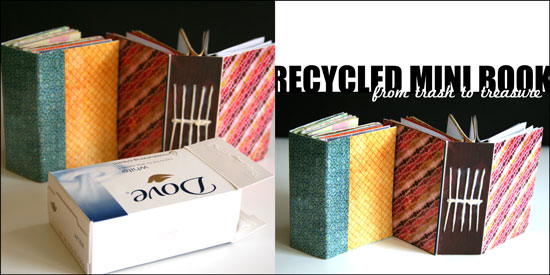
Recycled Mini Book

The Story

You know how much I love recycling and turning my trash into treasure so it’s no surprise that I came up with this project after my bathroom got filled with empty boxes of soap.

When Amy from Mod Podge Rocks e-mailed me and asked if I wanted to use some of the Plaid products on my future projects I knew this mini book idea would be perfect for the test run. The funny thing is that just before Amy e-mailed me, I already bought a huge bottle of Mod Podge Gloss for paper just the week before so I had a chance to try out 2 other products that got sent to me by the company: Mod Podge Hard Coat and Mod Podge Sparkle.

I really, really, really loved the Mod Podge Hard Coat. I initially chose it for another project. I accidentally ruined a set of coasters I had and thought the Hard Coat formula will be perfect to restore them. However I used this as a top coat for the mini book and it is amazing. It is a bit thicker than the original formula and it dries clear into a hard coat (just as its name suggests…) that seals the cover and secure the binding of the book. I really recommend this for book makers.

The Sparkle formula has fine glitter in it and it adds a fun glittery top coat to any surface. What i like about it is that it adds the glitter without the mess that usually goes with it… You just need to apply it with a foam brush and the glittery particles doesn’t rub off of it after it dries up.

The recycled mini book can be made out of any box, of any size, so I purposefully left out exact measurement, so you can use the same technique on any empty box that comes your way.

So if you feel like playing along and learn how to make this recycled mini book, keep on reading.

Tools and Supply

This project uses MINIMAL supply, as it’s mostly recycled.

How To


[Go here to watch on YouTube and while there, please rate, comment and subscribe.]

Step by Step Instructions

  1. Flatten the box by carefully disconnecting the connecting flaps at the bottom and inside the box. You may also use a craft knife for that.
  2. Use your scissors to cut off the flaps, as well as the inner flap and the short edge attached to it, so you are left with 3 sections: 2 cover sections and a spine, already creased for you…
  3. Measure the width and height of the cover sections and the spine and cut pieces of patterned paper at the same size for the cover. If you want to conceal the binding you will need one piece the size of the cover section and the other size larger by the width of the spine plus an additional inch. If you choose to conceal the binding, adhere the outer cover papers at the end.
  4. Apply a thin layer of Mod Podge to the cover section and the spine, lay the pattern paper on top of it and apply an additional layer of Mod Podge on top to seal it off. Put it aside to dry.
  5. Take a plain copier paper, the same width and height of the spine and mark 3 horizontal lines on it – one at the center and two additional ones, about an inch apart. If you work on a larger box, you may want to add more lines, equally separated from each other.
  6. Next mark equally separated vertical line, each line stands for one signature. I used 5 signatures, so I drew 5 vertical lines, one at the center and the rest in ¼” intervals.
  7. Cut your signature inserts to double the width of the cover section and the same height and fold each signature of paper inserts in half.
  8. Line up the paper guide with the inner crease of the signature and poke holes on the crease next to each of the 3 horizontal lines. these holes will help later with the binding process.
  9. After the inner cover is layered with paper with a base and top coat of Mod Podge and completely dry, line up the paper guide with the inner spine and poke a hole at each of the intersections of the horizontal lines with the vertical lines.
  10. Start binding the signatures together. Take the first one, insert the needle through the center hole and into the center hole of the signature, than to the upper hole and back from the bottom hole, into the center hole to the outer cover – repeat on all the signatures.
  11. Once you finish binding all the signatures together, weave the thread through the center line of threads until it meets the initial loose end and tie them together in a tight knot. Cut the excess thread and tidy up the knot to look as smooth and straight as possible.
  12. Lastly, apply a layer of Mod Podge Top Coat on top of the outer cover and the spine, it will secure the binding as well. You may also apply an additional layer of Sparkle Mod Podge if you want a fun glittery finish to your mini book.
  13. Enjoy!!!

Share

If you have any question, suggestion or remark – don’t hesitate to contact me – either leave a comment here, use the contact form or start a new thread on the Creativity Prompt Flickr Group!!!

I would also be very happy to see your own creations, so don’t be shy and share :)


Make Your Own Planner 2012
Check out Creativity Prompt’s new and unique self paced workshop: “Make Your Own Planner”.
This workshop will show you how to make a beautiful handmade planner for the year 2012. Not only are you going to get the entire meticulously designed planner kit for instant download, but you will also get a high resolution video tutorial as well as step-by-step instructions to guide you on each step of the way. Either treat yourself with a fresh and creative start for the coming new year, or get it to create wonderful gifts for your family and friends.
Join now


Make Your Own Planner Workshop
Check out Creativity Prompt’s self paced workshop: “Capture Your Dream”. In this workshop you will capture, follow and make your dream come true as well as document your journey in a fabulous mixed media mini album.


Hybrid Mini Album – Step By Step

Monday, September 6th, 2010

Hybrid Mini Album - Collage

On Friday my husband turned thirty.

My beautiful, wonderful, perfect husband has joined the thirty something group and I will join him in October.

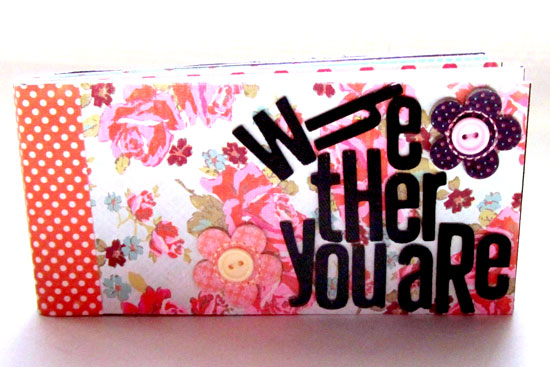
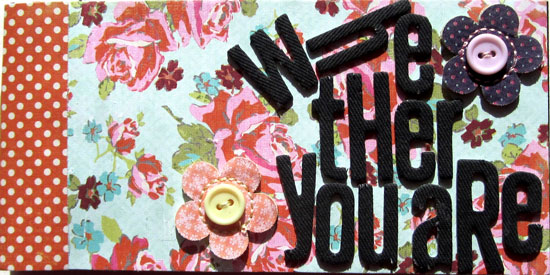
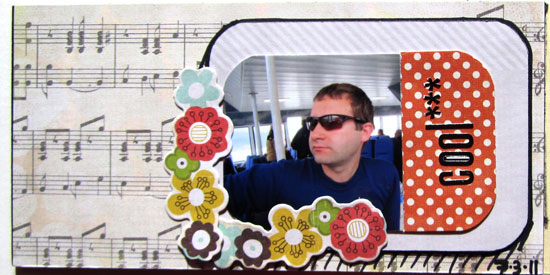
I wanted to make a book telling him how awesome he is while incorporating photos from the last year in our life (and one from 29 years ago…)

The easiest way for me to go about it was to make a hybrid mini album.

A hybrid is an album created partly digitally on the computer and partly traditionally with papers, adhesive and other scrapbooking goodies.

I created all the photo collages and titles for the album with Adobe’s Photoshop Elements 8.0 and the rest by hand, here is how I went about it:

Supply

In this album I was using a ton of different products I have had piled up in my office, so I will not tire you with the complete list. I will only highlight some of the main products I was using and loving.

Step By Step Instructions


Digital Part

  1. Open a letter size file with 300 DPI resolution.
  2. Use the rectangle shape tool to draw a 6 by 6 square in the middle of your page – that will be your page base. Choose a very faint color for the square, to save ink later…
  3. Create your design only on the 6″ by 6″ area. (I only used fonts, “Impact” in particular.)
  4. To print your design, click on the eye icon next to the layers with your page design, that will conceal everything but the 6 by 6 square.
  5. Print your page on plain copy paper. It will be used as your positioning guide later.
  6. Now conceal the square by clicking on the eye icon and reveal your design again.
  7. Adhere a 6″ by 6″ piece of cardstock to the printed rectangle on your copy paper. Use temporary adhesive to make its removal easier.
  8. Put your copy paper through your printer again, with the cardstock attached to it.
  9. Print your page design.
  10. Repeat. (You don’t have to print the positioning guide again if you don’t move the square on your screen.)

  11. For the photos I just cropped each photo individually to the size I wanted it and layered all the photos on a letter size document I then printed on photo paper.
  12. raw materials

Traditional Part

  1. Crop all your photos.
  2. Design your pages, add letter stickers to add texture to the rather flat printed titles.
  3. You may also use the free journaling tags you can find here, on Creativity Prompt. They will help you add your journaling in an easy and polished way.
  4. After you finished all the pages design, gather all the pages in the order you want them to be and make sure no page is rotated.
  5. I also added two 6″ by 6″ acetate pages to protect the front and back cover pages.
  6. Use the crop-a-dile to punch holes for the book rings. Punch them at 1″, 3″ and 5″, about ½” from the edge.

Photos of the Finished Mini Album

Hybrid Mini Album Pages

Hybrid Mini Album Pages

Hybrid Mini Album Pages

Hybrid Mini Album Pages

Hybrid Mini Album Pages

Hybrid Mini Album Pages

Hybrid Mini Album Pages

Hybrid Mini Album Pages

Hybrid Mini Album Pages

Hybrid Mini Album Pages

Hybrid Mini Album Pages

Share

Do you use the computer to add titles or other elements to your scrapbook pages? Please share by leaving a comment here.

Welcome Little One Workshop
Check out Creativity Prompt’s new and unique self paced workshop: “Welcome Little One”. This workshop will provide you with everything you need, and then some, to make a fabulous handmade mini album to record the first moments of a new born baby.


Park Adventures And How To Use Fonts As Die Cuts

Wednesday, September 1st, 2010

Park Adventures

[Fonts: Impact and Adler; Digital Kit: KD Crush by Karla Dudley.]

As a scrapbooker, or a memory archiver, I find myself doing things I would never imagine doing, just for the sake of collecting visual memories.

This layout is a wonderful example of such irrational behavior.

The pictures in the layout were taken with a regular 55mm lens – no tele lens, no zoom – I was standing right in front of the huge bear.

Gladly, I caught Mr. bear on a good day…
(I hope he isn’t traumatized by the insane human who ran after him with a camera)

How To Create Digital Letter Die Cuts

In this layout I used Karla Dudley’s newest digital kit, “KD Crush”, which will be available tomorrow at the Digichic online store. The kit is based on a natural color palette, just in time for fall and includes beautiful papers, brushes and elements (including an alpha set).

However, I used it a bit differently by masking the patterned paper to a regular true type font.

Here is how I made the title for my layout above:

  1. Choose any font, preferably a dominant one, such as “Impact” to give room for the digital patterned paper.
  2. Type down your title, each word separately to allow maximum control over its position.
  3. Decide what is the FINAL position and size of each letter in the title.
  4. Simplify all the title layers (by right clicking on each layer and selecting “simplify”).
  5. Merge the layers together (just select all the relevant layer and then right click on your selection and opt for “merge layers”. To select a couple layers together press the CTR or CMD key while clicking on the layers).
  6. Insert any patterned paper and make sure its layer is directly above the title layer.
  7. Mask the two layers together by pressing “CTR+G” or “CMD+G”.
  8. You may now merge the 2 layers together to add a drop shadow or leave it as is.

Share

Have you ever acted out of character just to take a picture or preserve a memory? Please share your story by leaving a comment here.


Welcome Little One Workshop
Check out Creativity Prompt’s new and unique self paced workshop: “Welcome Little One”. This workshop will provide you with everything you need, and then some, to make a fabulous handmade mini album to record the first moments of a new born baby.


How To Change the Color of the Journaling Tags

Wednesday, August 4th, 2010

I have been posting a lot of free printable journaling tags.

I have been asked several times how can you change the color of these tags with a photo editing software, such as Photoshop or Photoshop Elements and each time I answered individually.

It took me a while to figure out that my answer may interest many of you too, so here it goes:

  1. Open the pdf file with photoshop.
  2. Open a new layer underneath the file layer.
  3. Make sure your file layer is highlighted and pick the white in the file, using the magic wand tool.
  4. Press delete.
  5. From the menu bar choose “Edit” =>”Fill in layer” => choose “color” and change it to any color you want.
  6. Fill in the “preserve transparency” check box and click “apply” or “ok”.
  7. If the last 2 steps don’t work for you, try to press CTR+U or CMD+U and change the hue and saturation settings.

I hope that helps you guys :)

Have a great day.